Dette programtillegget vert brukt for å spela av ein animasjon frå eit bilete med fleire lag. GIMP har støtte for fleire format som kan brukast for å eksportera ein animasjon, for eksempel webp, gif og mng. I tillegg kan GIMP lasta inn, men for tida ikkje eksportera, apng-bilete. Vanlege format med fleire lag, som GIMP sitt XCF og PSD, TIFF og PSP tillét å bruka mange lag som kan spelast av med denne avspelaren som animasjonar.
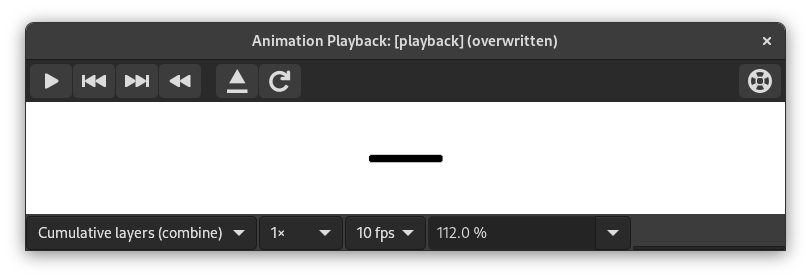
Dette dialogvindauget inneheld :
- Førehandsvising
-
I midten av avspelingsvindauget finn du ei førehandsvising av animasjonen som automatisk vert tilpassa rammestorleiken. Talet på viste rammer vert vist under førehandsvisinga ved sida av kontrollelementa saman med det totale talet på rammer.
- Nedtrekkslistene øvst
-
Desse nedtrekkslistene og kontrollelementa er tilgjengelege over førehandsvisinga:
- Kombiner/byt ut lag
-
Dette kan vera for å visa alle rammer så langt oppå kvarandre, eller for å visa berre den siste ramma.
- Standard rammefart
-
Dette let deg setja kor mange rammer som skal visast per sekund når du spelar av animasjonen.
- Fart på avpelinga
-
Her kan du setja kor fort animasjonen skal visast.
- Forstørr
-
Dette gjev deg høve til å setja kor mykje animasjonen skal forstørrast eller forminskast.
- Kontrollelementa for avspelaren oppe til høgre
-
-
 Last biletet på nytt
-
Dette lastar inn animasjonen igjen. Nyttig viss det er gjort endringar.
-
 Kopla animasjonen frå dialogvindauget
-
Dette koplar animasjonen frå dialogvindauget.
-
 Hjelp
Hjelp
-
Vis denne dokumentasjonen for «Animation Playback».
-
- Kontrollelementa for avspelaren nedst
-
Dei følgjande knappane er tilgjengelege under førehandsvisinga:
-
 Start/stopp avspelinga
-
Dette spelar av eller stoppar animasjonen.
-
 Gå bakover til førre ramma
-
Dette spelar av animasjonen baklengs steg for steg.
-
 Gå til neste ramme
-
Dette spelar av animasjonen steg for steg.
- Spol animasjonen tilbake
-
Dette spolar animasjonen tilbake til byrjinga.
-


