HEIF steht für High Efficiency Image File Format (deutsch »Hocheffizientes Bild-Dateiformat«) und ist auch unter HEIC (High-Efficiency Image Container, deutsch »Hocheffizienter Bildbehälter«) bekannt.
Twice as much information can be stored in a HEIF image as in a JPEG image of the same size, resulting in a better quality. As of September 2022, no browser supports HEIF natively.
More information in Wikipedia.
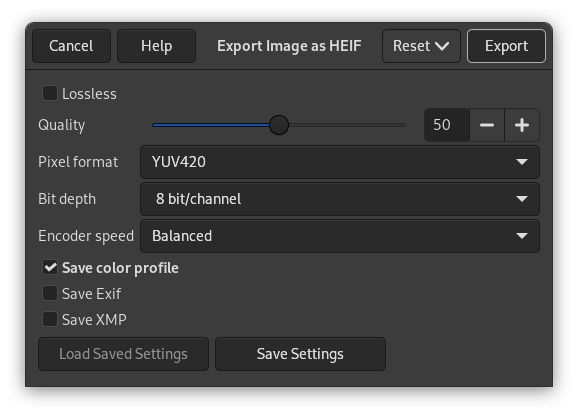
- HEIF-Eigenschaften
-
- Verlustfrei
-
When checked, the image will be exported with lossless compression. This will create a higher quality image at the cost of a larger file size.
- Qualität
-
If Lossless is not checked, this value determines the quality of the image compression. 100 provides the best quality image and lowest compression, while 0 provides the highest compression and worst quality image.
- Pixelformat
-
Defines what pixel format the exported image should use for color sub-sampling. There are three options:
-
YUV420: Suitable for photographs with lossy compression. This format is most compatible with other software that uses HEIF.
-
YUV444: When used with a high Quality setting, this format exports a visually lossless image.
-
RGB: Useful when exporting images with true lossless quality.
-
- Bittiefe
-
Determines if the pixel data should be stored using 8 bits, 10 bits, or 12 bits per color channel.
- Encoder speed
-
The tradeoff between speed and compression. Slow will provide a smaller filesize but takes longer to encode.
- Farbprofil speichern
-
If checked, the color profile is embedded in the exported image.
- Exif-Daten speichern
-
If checked, the Exif metadata is embedded in the exported image.
- XMP-Daten speichern
-
If checked, the XMP metadata is embedded in the exported image.


