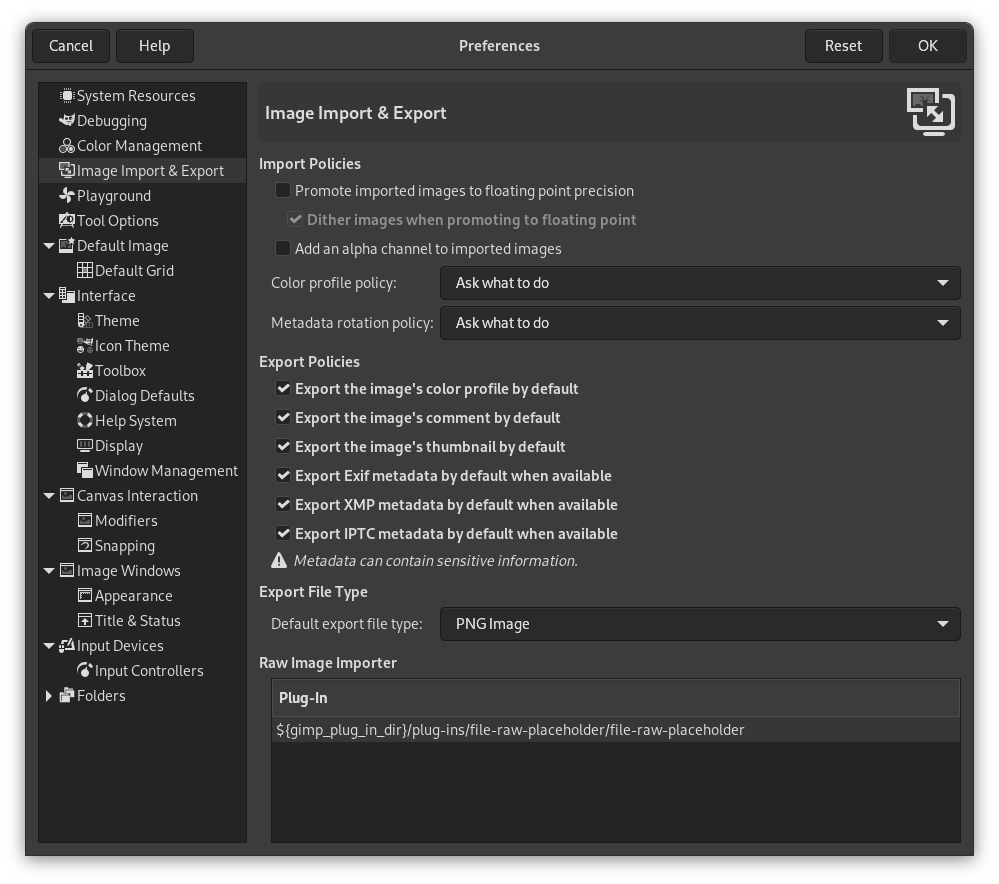
This page lets you customize settings related to importing and exporting images.
Importregeln
- Importierte Bilder in Gleitkomma-Präzision anheben
-
When enabled, all imported images have their precision changed to 32-bit floating point.
- Beim Umwandeln importierter Bilder in Gleitkomma-Präzision Dithering anwenden
-
When the previous setting is enabled, this setting allows you to choose whether dithering should be applied when a lower precision image is changed to 32-bit floating point.
- Einen Alphakanal zu den importierten Bildern hinzufügen
-
When enabled, an alpha channel is automatically added to any imported image that doesn't have one yet. This can be useful if you usually require an alpha channel to be present for your workflow.
- Richtlinie des Farbprofils
-
When importing an image that has a color profile attached to it, you can choose here what action needs to be taken. See File Open Behavior in the Color Management preferences.
- Richtlinie für Metadaten bei Drehung
-
When importing an image that has metadata about the rotation of the image attached to it, you can choose here what action needs to be taken.
-
Ask what to do This is the default. Every time you open an image with rotation metadata, a dialog opens that asks you whether to rotate the image according to the metadata.
-
Discard metadata without rotating When selecting this, rotation metadata will be ignored when opening an image.
-
Rotate the image then discard metadata When selecting this, an image will always be rotated according to the metadata when it is opened. After that is done, the rotation metadata is discarded and replaced by default values for the rotation metadata.
-
Exportrichtlinien
![[Anmerkung]](images/note.png)
|
Anmerkung |
|---|---|
|
The following export policies define the default values when exporting an image. Most formats have image export dialogs where, among other things, you can further adjust the relevant setting for that specific format. These per format settings are remembered across restarts. Not all image formats support all of the below settings. They are only relevant for image formats that support the setting. It is good to be aware of the implications of including certain metadata. Metadata can contain sensitive personal information that you may want to review first before deciding to include it or not. Examples are GPS metadata that can show an exact location, or name and address of the creator of the image. |
- Standardmäßig das Farbprofil des Bildes exportieren
-
When enabled, the default for exporting images is to include the color profile.
- Standardmäßig den Kommentar des Bildes exportieren
-
When enabled, the default for exporting images is to include the comment.
- Standardmäßig das Vorschaubild des Bildes exportieren.
-
When enabled, the default for exporting images is to include the thumbnail.
- Standardmäßig Exif-Metadaten exportieren, falls verfügbar
-
When enabled, the default for exporting images is to include exif metadata.
- Standardmäßig XMP-Metadaten exportieren, falls verfügbar
-
When enabled, the default for exporting images is to include XMP metadata.
- Standardmäßig IPTC-Metadaten exportieren, falls verfügbar
-
When enabled, the default for exporting images is to include IPTC metadata.
Export-Dateityp
- Standard-Dateityp beim Exportieren
-
This setting allows you to select what file format should be used by default when exporting an image, without explicitly choosing an extension of a known image file format.
Note that this is only relevant when exporting a new image created in GIMP. When exporting an image that was previously imported, GIMP uses the extension of that imported image.


